
Disclosure: As an Amazon Associate, I earn from qualifying purchases. If you buy through links on this page, CinemaSetup Lab may earn a small commission at no extra cost to you. Commission schedules (for example, 2% on televisions versus 4% on most AV receivers, soundbars, and HDMI accessories) never influence our compatibility rules, certification audits, or hardware picks.
Asking do expensive hdmi cables make a difference usually happens at the checkout counter right after buying a new 4K OLED television, gaming console, or AV receiver—when a salesperson hands you a $150 braided cord promising deeper blacks, richer Dolby Vision highlights, and cleaner Dolby Atmos surround sound. Across short living-room runs, those visual and acoustic claims are pure marketing myth. As detailed in our best home theater accessories hub, HDMI is a packetized digital interface: once a cable meets the official bandwidth specification for your signal, every pixel and audio sample arrives bit-for-bit identically regardless of whether the cord cost under $25 or over $200.
Quick Answer: Over short runs up to 10 ft (3.0 m), expensive boutique HDMI cables make zero difference to picture sharpness, HDR contrast, or Dolby Atmos sound quality compared with an officially certified Ultra High Speed 48 Gbps cord. Paying more only matters when buying Active Optical Fiber (AOC) for runs past 10–16 ft (3.0–4.9 m) or UL CL2/CL3 in-wall fire-rated jackets (CR-ACC-DISP-01).
The nuance that keeps this debate alive is that some higher-priced cables genuinely solve physical failure modes—just not the ones printed on audiophile packaging. Under CinemaSetup Lab compatibility rule CR-ACC-DISP-01, jumping from an older 18 Gbps HDMI 2.0 cord to a 48 Gbps Ultra High Speed cord—or stepping up from passive copper to directional fiber optics on a 35 ft (10.7 m) ceiling projector run—prevents blank screens, Variable Refresh Rate (VRR) flicker, and 60 Hz lockouts. Separating digital signal physics from retail placebo saves hundreds of dollars you can put toward speakers, subwoofers, or room acoustics instead.
In This Guide
- 1. Digital HDMI Physics: Why 1s and 0s Ignore Precious Metals
- 2. Worked Engineering Example: 4K120 FRL Bandwidth & Copper Distance Limits
- 3. HDMI Cable Decision Matrix: When Price Matters vs. When It Doesn’t
- 4. Myth vs. Engineering Reality: 5 Expensive HDMI Myths Exposed
- 5. The 3 Real Reasons to Pay More for an HDMI Cable
- 6. Verified Amazon US Cable Benchmarks (Short Copper vs. Long-Run AOC Fiber)
- 7. In-Wall Fire Codes (CL2/CL3), Installation Safety & Warranty Checks
- 8. Authoritative Technical Standards & References
- 9. Frequently Asked Questions
1. Digital HDMI Physics: Why 1s and 0s Ignore Precious Metals
To understand why a $20 certified cable produces the exact same image on a flagship LG C6 or Samsung S90H OLED television as a $250 boutique cable, look at how HDMI actually moves data. Unlike legacy analog component video or speaker wire—where cable resistance, capacitance, and oxidation subtly alter continuous voltage waveforms—HDMI carries high-speed digital packets encoded onto differential copper pairs (or modulated laser pulses inside fiber optic strands).
According to the HDMI Forum HDMI 2.1 specification, modern home theater gear uses two primary link architectures:
- TMDS (Transition-Minimized Differential Signaling, up to 18 Gbps): Used by HDMI 1.4 and HDMI 2.0b hardware for 1080p, 4K at 60 Hz HDR, and standard ARC audio. Three data lanes carry video and audio packets alongside a dedicated clock lane using 8b/10b encoding.
- FRL (Fixed Rate Link, 24 to 48 Gbps): Introduced in HDMI 2.1 for 4K at 120 Hz, 8K at 60 Hz, Variable Refresh Rate (VRR), and uncompressed high-bit-depth RGB. FRL upgrades all four lanes to data transmission up to 12 Gbps per lane using 16b/18b encoding plus embedded Reed-Solomon Forward Error Correction (FEC) and packet link training.
Both architectures exhibit a steep digital cliff. As long as the receiver chip inside your TV, projector, or AV receiver reliably distinguishes binary ones from zeros above the noise floor—aided in HDMI 2.1 by FRL link training and FEC—the reconstructed RGB pixels and Dolby TrueHD audio frames are mathematically identical to what left your PlayStation 5, Apple TV 4K, or 4K UHD Blu-ray player. Silver plating, oxygen-free monocrystal copper, nitrogen-injected dielectric foam, or cryogenic treatment cannot make a binary 1 “brighter” or a 0 “deeper.”
When an HDMI cable does fall short electrically, the failure is never subtle tonal coloration. You will see unmistakable digital breakdown: sparkling white pixels (“HDMI sparkles”), intermittent black dropouts, handshake loops when launching a VRR game, or silent downgrades from 4K/120Hz 10-bit RGB down to 4K/60Hz or compressed chroma.
2. Worked Engineering Example: 4K120 FRL Bandwidth & Copper Distance Limits
Rather than relying on vague showroom claims, you can calculate exactly what your cable must carry—and why distance, not copper purity, creates real bottlenecks. By our estimate from published HDMI Forum FRL signaling parameters and CTA-861 video timing standards (note: these are engineering calculations from published specifications rather than lab measurements):
- Scenario Assumptions: A PlayStation 5 Pro or gaming PC connected through a 40/48 Gbps AV receiver (such as the Denon AVR-X3900H) or directly to an OLED TV at
3840 × 2160resolution,120 Hzrefresh rate,10-bitcolor depth (30 bits per pixel), and uncompressed4:4:4 RGBchroma, plus lossless Dolby TrueHD Atmos audio over eARC. - Video Payload Calculation: Including standard CTA-861 horizontal and vertical blanking intervals (roughly a
4400 × 2250total pixel grid), required raw video throughput equals4400 × 2250 × 120 × 30 = 35,640,000,000 bps ≈ 35.64 Gbps(or ~32 Gbps under CVT-R2 reduced blanking). - Audio Return Payload: Under Dolby Atmos home theater delivery specs, lossless Dolby TrueHD spikes past 4–10+ Mbps and 8-channel 48 kHz/24-bit LPCM sits near 9.2 Mbps—easily fitting inside HDMI eARC’s dedicated ~37 Mbps differential channel (HEAC).
- Why Cable Class Matters (18 Gbps vs. 48 Gbps): An older 18 Gbps Premium High Speed HDMI cable delivers
14.40 Gbpsof effective TMDS payload after 8b/10b overhead—less than half of the 32–35.64 Gbps needed for 4K120 10-bit RGB. Upgrading to an Ultra High Speed HDMI (48 Gbps FRL-6) cable raises raw lane speed to 48 Gbps (42.67 Gbpseffective payload after 16b/18b overhead), giving clean headroom for 4K120, VRR, and HDR. - Why Length Beats Price Beyond ~10–16 ft (3.0–4.9 m): At 6.6 ft (2.0 m), both a $15 certified Ultra High Speed cable and a $200 boutique copper cable clear FRL-6 link training with identical zero-error frames. Stretch passive copper to 40 ft (12.2 m) for a ceiling-mounted projector, however, and high-frequency 6 GHz fundamental lane signaling attenuates sharply across copper wire regardless of brand prestige—triggering handshake failure under rule CR-ACC-DISP-01. Replacing that 40 ft (12.2 m) copper cord with a directional Active Optical Fiber (AOC) cable converts electrical signals to light pulses at the Source plug, preserving 48 Gbps lock cleanly.
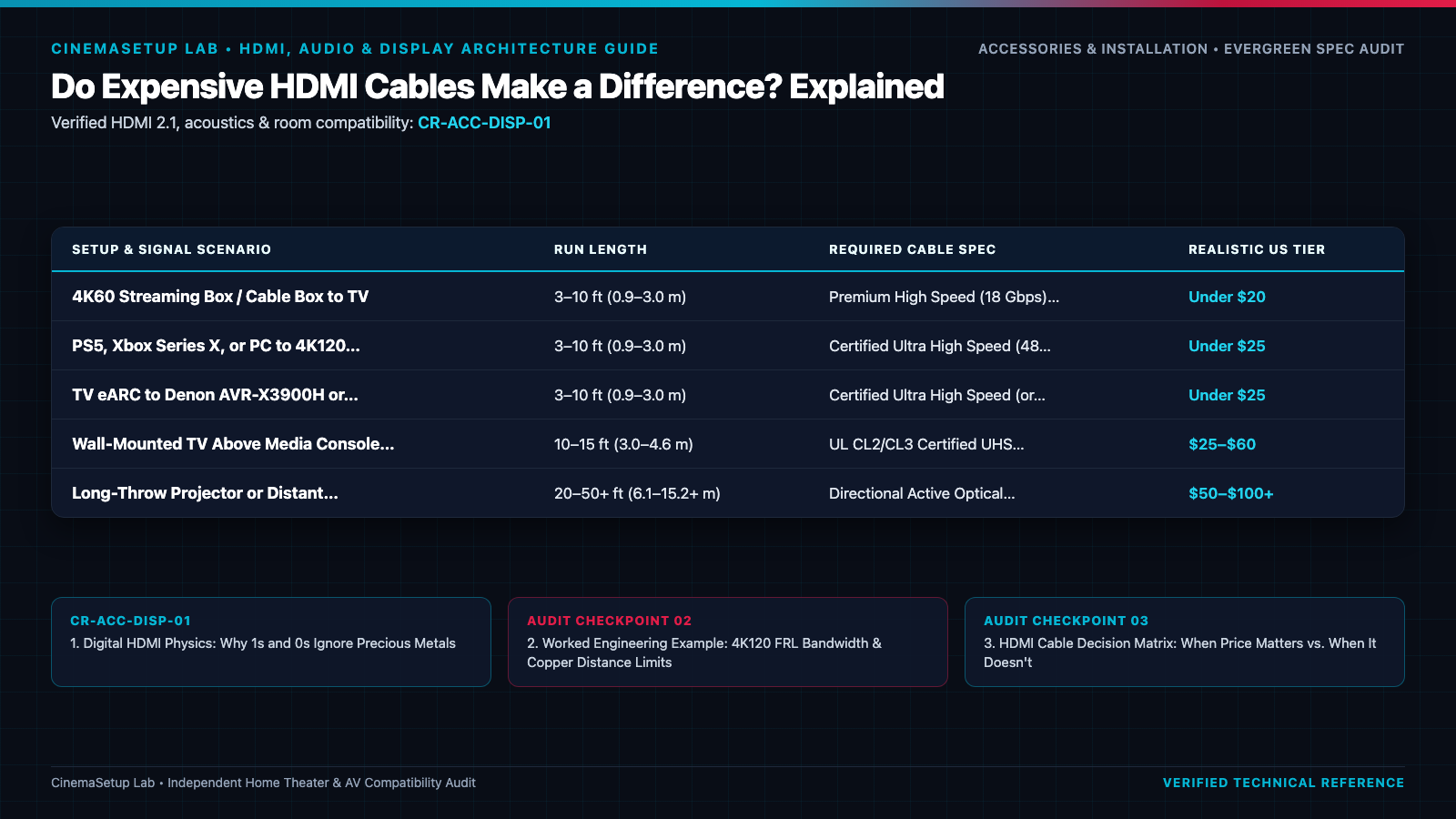
3. HDMI Cable Decision Matrix: When Price Matters vs. When It Doesn’t
Use this decision matrix to match your exact home theater connection path, span length, and certification tier without overpaying for placebo hardware.
| Setup & Signal Scenario | Run Length | Required Cable Spec | Realistic US Tier | Does Paying More Help? | Governing KM Rule |
|---|---|---|---|---|---|
| 4K60 Streaming Box / Cable Box to TV | 3–10 ft (0.9–3.0 m) | Premium High Speed (18 Gbps) or UHS | Under $20 | No — existing 18 Gbps cords already carry 4K60 Dolby Vision & DD+ Atmos identically. | STD-HDMI-CABLE-PREMIUM |
| PS5, Xbox Series X, or PC to 4K120 OLED TV | 3–10 ft (0.9–3.0 m) | Certified Ultra High Speed (48 Gbps) | Under $25 | No past ~$25 — certified UHS copper matches $150+ boutique cords pixel-for-pixel. | CR-ACC-DISP-01 • G-14 |
| TV eARC to Denon AVR-X3900H or Samsung HW-Q990H | 3–10 ft (0.9–3.0 m) | Certified Ultra High Speed (or HS w/ Ethernet) | Under $25 | No — lossless TrueHD Atmos and 7.1 LPCM depend on eARC chipsets, not luxury copper. | CR-ACC-DISP-01 |
| Wall-Mounted TV Above Media Console (Concealed) | 10–15 ft (3.0–4.6 m) | UL CL2/CL3 Certified UHS Copper or AOC | $25–$60 | Modestly — pay for official UL CL2/CL3 fire rating and strain relief, not silver wire. | CR-ACC-DISP-01 • G-27 |
| Long-Throw Projector or Distant Equipment Rack | 20–50+ ft (6.1–15.2+ m) | Directional Active Optical Fiber (AOC, 48 Gbps) | $50–$100+ | Yes (topology only) — optical transceivers avoid copper attenuation past ~16 ft (4.9 m). | CR-ACC-DISP-01 • ISS-ACC-FIBER |
4. Myth vs. Engineering Reality: 5 Expensive HDMI Myths Exposed
Myth-Busting Audit (Rules G-14, CR-ACC-DISP-01 & ISS-ACC-FAKE-HDMI-CERT):
- Myth 1: “Silver-plated conductors and gold connectors improve OLED color, contrast, and Dolby Atmos clarity.”
Engineering Reality: Once a digital HDMI link achieves error-free synchronization, neither conductor metallurgy nor gold-plated connector shells alter pixel brightness, HDR tone mapping, or speaker frequency response (G-14). Gold plating merely resists surface corrosion over years of sitting behind an AV cabinet—and virtually every $10 certified cable already uses gold-plated pins. - Myth 2: “A $180 boutique HDMI cord delivers lower input lag or ‘faster’ 120 Hz frames than a $15 certified cord.”
Engineering Reality: Electrical propagation speed inside copper coax or twisted-pair wire sits near 65–80% of the speed of light (~1.5 nanoseconds per foot). Across a 6.6 ft (2.0 m) living-room cord, signal transit takes roughly 10 nanoseconds—one-millionth of a single 120 Hz frame (8.33 milliseconds). Latency comes from TV image processing and AVR scaling, never HDMI cable cost. - Myth 3: “Every Amazon listing stamped ‘8K@60Hz / 48 Gbps / HDMI 2.1’ is genuinely certified.”
Engineering Reality: Marketplace listings routinely print “8K” and “48 Gbps” without completing official certification (ISS-ACC-FAKE-HDMI-CERT). An uncertified 18 Gbps cable can pass 4K60 Netflix streaming and collect thousands of positive reviews while failing silently on 4K120 VRR gaming. Audit suspicious listings with our fake 8K HDMI cables on Amazon checklist. - Myth 4: “Thick 24 AWG passive copper guarantees 48 Gbps performance at 30 to 50 ft (9.1 to 15.2 m).”
Engineering Reality: High-frequency skin effect and dielectric loss still attenuate 48 Gbps FRL6 signals across long passive copper regardless of heavy-gauge branding. Under CR-ACC-DISP-01, treat any passive copper run past ~10–16 ft (3.0–4.9 m) as unverified for 4K120 and switch to Active Optical Fiber instead. - Myth 5: “Active fiber optic HDMI cables work in either direction just like passive copper.”
Engineering Reality: Optical AOC cords embed active laser transmitters in the Source plug and photodetectors in the Display plug (ISS-ACC-FIBER-DIRECTION). Reversing the cable behind drywall yields zero picture and requires pulling the entire run back out.
5. The 3 Real Reasons to Pay More for an HDMI Cable
Knowing that luxury metals do nothing for picture or sound does not mean buying the cheapest $4 generic cord in a bargain bin is smart. When you step up modestly—from $6 uncertified cords to $15–$25 certified copper or $50–$100+ active fiber—you are paying for three measurable engineering protections.
1. Official HDMI Forum Ultra High Speed QR Certification
The HDMI Licensing Administrator Ultra High Speed HDMI Cable Certification Program requires every length of a certified model family to pass compliance verification at an official HDMI Forum compliance center across full 48 Gbps FRL signaling plus electromagnetic interference (EMI) suppression. That EMI check prevents high-frequency HDMI traffic from knocking out nearby 2.4 GHz Wi-Fi routers, wireless subwoofer dongles, or Bluetooth remotes. Always look for the tamper-evident holographic QR sticker on the retail box and scan it inside the official HDMI Cable Certification smartphone app. Browse our vetted picks in best HDMI cables for 4K 120Hz.
2. Active Optical Fiber (AOC) for Runs Exceeding 10–16 ft (3.0–4.9 m)
If your AV rack sits in a closet or you are feeding a ceiling-mounted 4K projector 25 to 50 ft (7.6 to 15.2 m) away, paying $50 to $100+ for an Active Optical Cable is money well spent. Inside an AOC cord, micro-chips in the Source connector convert electrical FRL signals into light across thin glass or polymer fibers, then convert them back at the Display connector with almost zero attenuation. Just keep two operational constraints in mind: AOC cables are strictly directional (always verify video output before sealing walls), and because the optical electronics draw roughly 5 V power from the HDMI port, budget AV switches or older projectors occasionally need an external 5 V USB power injector.
Wiring multiple 4K120 consoles alongside a TV eARC return path? Map every short and long hop cleanly with our HDMI eARC and 4K120 port-planning guide before ordering extra cables.
3. UL CL2/CL3 In-Wall Fire Jackets, Mechanical Strain Relief & Brand Support
Tight bends behind a flush-mounted OLED television put heavy mechanical torque on delicate 19-pin HDMI Type-A receptacles. Paying $15 to $35 for a recognized accessory brand with reinforced molded strain reliefs, snug connector tolerances, and clear US customer support helps avoid loose-jack signal dropouts over time. Likewise, concealing any HDMI cable inside drywall requires official UL CL2, CL3, or CMP plenum jacket ratings that standard bargain patch cords lack.
6. Verified Amazon US Cable Benchmarks (Short Copper vs. Long-Run AOC Fiber)
To anchor these engineering thresholds in real US retail inventory (verified against Amazon US ZIP 10001 on 2026-11-26), the four verified SKUs below illustrate the practical price tiers—from an ultra-plain 3 ft (0.9 m) patch cord to a 40 ft (12.2 m) directional fiber optic run.
1. Anker HDMI 2.1 Cable (6.6 ft, 48 Gbps Certified Ultra High-Speed) — Everyday Benchmark

Key Audited Specs & Box Contents: Length: 6.6 ft (2.0 m) | Bandwidth: 48 Gbps Certified Ultra High Speed HDMI | Supported Signals: 4K@120Hz, 4K@240Hz (DSC), 8K@60Hz, VRR, ALLM, eARC, Dolby Vision, HDR10+, HDCP 2.3 | Topology: Bi-directional passive copper, double-braided nylon jacket | In the Box: Single 6.6 ft (2.0 m) Anker HDMI 2.1 cable | Price Tier: Under $25
The Anker 6.6 ft (2.0 m) Ultra High Speed HDMI 2.1 Cable is our baseline sanity check against $150+ luxury cables. Listed as officially certified 48 Gbps Ultra High Speed with 4.7 stars across 4,218 Amazon US reviews, it passes full 4K120 10-bit RGB, VRR, and lossless TrueHD eARC without asking you to pay for exotic metallurgy. Confirm the seller shows AnkerDirect or Amazon.com at checkout for straightforward US warranty support (G-26), and scan the box’s holographic QR seal upon arrival.
Pros
- Officially certified 48 Gbps FRL bandwidth delivers identical bit-for-bit 4K120 and eARC performance to boutique cables under 10 ft (3.0 m)
- Reinforced connector housings and braided sheath hold up well to frequent console or AVR swaps
Cons
- Braided outer jacket is slightly stiffer than smooth PVC cords around tight rear-facing wall-mount TV jacks
- 6.6 ft (2.0 m) span is too short for wall-to-closet runs or ceiling projectors
2. Amazon Basics HDMI 2.1 Cable (3 ft, 48 Gbps Ultra High Speed) — Short-Span Bit-Parity Proof
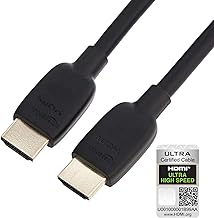
Key Audited Specs & Box Contents: Length: 3 ft (0.9 m) | Bandwidth: 48 Gbps Ultra High Speed HDMI | Supported Signals: 4K@120Hz, 8K@60Hz, VRR, eARC, Dynamic HDR | Topology: Bi-directional passive copper, flexible PVC jacket | In the Box: Single 3 ft (0.9 m) Amazon Basics HDMI 2.1 cable | Price Tier: Under $20
At just 3 ft (0.9 m), the Amazon Basics HDMI 2.1 Cable (4.7 stars across 6,362 Amazon US reviews) illustrates why cable length makes short-run boutique pricing irrelevant. Over 36 inches between an Apple TV 4K or 4K Blu-ray player and an AV receiver sitting on the next shelf, electrical signal loss is negligible. A flexible PVC jacket bends more easily inside shallow media stands than thick braided cords, though you should inspect the delivered package for the official HDMI Forum QR certification label (ISS-ACC-FAKE-HDMI-CERT) and recognize standard PVC jackets are not rated for concealed in-wall routing.
Pros
- Compact 3 ft (0.9 m) span keeps rear AV rack clutter minimal while passing 48 Gbps 4K120 and eARC signals
- Sold directly by Amazon.com with predictable return coverage and thousands of verified buyer reviews
Cons
- 3 ft (0.9 m) length barely reaches from a tabletop console to a wall-mounted TV
- Standard PVC jacket lacks CL2/CL3 in-wall fire certification
3. Belkin 8K Ultra High-Speed HDMI 2.1 Cable (6.6 ft, 48 Gbps) — Mainstream Brand Ceiling

Key Audited Specs & Box Contents: Length: 6.6 ft (2.0 m) | Bandwidth: 48 Gbps Ultra High-Speed HDMI 2.1 | Supported Signals: 8K@60Hz, 4K@120Hz, Dolby Vision, HDR10, eARC, VRR | Topology: Bi-directional passive copper, double-shielded braided cable | In the Box: Single 6.6 ft (2.0 m) Belkin Ultra High-Speed HDMI 2.1 cable | Price Tier: $25–$50
The Belkin 6.6 ft (2.0 m) Ultra High-Speed HDMI 2.1 Cable sits near the practical ceiling of what makes sense to spend on a short copper HDMI cord. If you prefer an established US retail brand carried alongside major consoles and Apple hardware—with double shielding and heavy strain relief—spending slightly more in the $25–$50 tier buys peace of mind on mechanical durability and manufacturer support. Visually and acoustically, however, it outputs the exact same binary stream as the under-$25 Anker cord above. Note that this specific ASIN currently shows a modest 18 Amazon US reviews (4.9 stars) at verification time, so confirm Amazon.com or authorized Belkin US seller fulfillment at checkout (G-26).
Pros
- Established US accessory brand with double shielding and robust connector strain relief
- Full 48 Gbps HDMI 2.1 spec support for 4K120, VRR, Dolby Vision, and lossless eARC
Cons
- Costs noticeably more per foot than equally certified Anker or Amazon Basics copper cords without improving image or audio fidelity
- Low Amazon US review sample size (18 reviews at check time) compared with long-running staples
4. 40 ft Unidirectional Fiber Optic HDMI 2.1 Cable (48 Gbps AOC) — Where Spending More Actually Works

Key Audited Specs & Box Contents: Length: 40 ft (12.2 m) | Bandwidth: 48 Gbps Active Optical Fiber (AOC) | Supported Signals: 4K@120Hz, 8K@60Hz (4:4:4), eARC, Dolby Atmos, DTS:X, HDR10, VRR, ALLM | Topology: Unidirectional optical fiber (Source → Display ends) | In the Box: Single 40 ft (12.2 m) braided fiber optic HDMI 2.1 cable | Price Tier: $50–$100
A 40 ft (12.2 m) Active Optical Fiber HDMI 2.1 Cable (4.7 stars across 1,657 Amazon US reviews) shows the one clear scenario where higher spending pays real dividends. At 40 ft (12.2 m), passive copper cannot hold 48 Gbps FRL6 signaling without dropping frames or falling back to 4K60 (CR-ACC-DISP-01). Optical-electrical conversion bridges that distance cleanly for ceiling projectors or closet AV racks. Two important marketplace caveats apply before ordering: this listing uses a generic storefront brand ("8K") whose long-term US warranty terms should be verified at checkout (G-26), and you must connect the Source plug to your AVR/console and the Display plug to your projector or TV before concealing the run (ISS-ACC-FIBER-DIRECTION). Also verify whether a braided jacket carries an explicit UL CL2/CL3 stamp before routing inside drywall (G-27).
Pros
- Solves long-distance 40 ft (12.2 m) 4K120, VRR, and eARC attenuation where expensive passive copper fails
- Slim optical core routes around corners more easily than thick 24 AWG long copper trunks
Cons
- Strictly unidirectional (installing Display-to-Source produces zero signal) and cannot withstand tight 90-degree kinks that fracture glass fiber
- Generic "8K" storefront brand with opaque US warranty terms and no verified UL CL2/CL3 in-wall rating stated in the title (G-26, G-27)
7. In-Wall Fire Codes (CL2/CL3), Installation Safety & Warranty Checks
Safety, Fire-Code & Seller Verification Checklist (G-26 & G-27):
- Use UL CL2 / CL3 / CMP Jackets Inside Walls: Never pull standard PVC or unrated braided HDMI cords behind drywall or inside air-return ceiling plenums. Under NFPA / National Electrical Code (NEC) low-voltage wiring rules, concealed residential cable runs require an explicit UL CL2 or CL3 (or CMP plenum where applicable) jacket rating matching your local building code.
- Follow Manufacturer Instructions & Hire Licensed Pros for Concealed Work: Always follow the TV mount, projector ceiling bracket, and cable manufacturer’s printed instructions—anchoring heavy displays into wall studs or rated masonry anchors and observing minimum bend radii on fiber optic cords. Consult a licensed electrician or licensed AV installer before cutting drywall, installing recessed power/low-voltage pass-through boxes, or running cables near AC wiring.
- Verify Both Ends Before Drywalling AOC Fiber: Connect your actual 4K120 source, AV receiver, and display to the fiber cable on the living-room floor first, confirming
Source→Displaydirection and full HDR/eARC lock before routing through conduit or studs. - Confirm US Authorized-Dealer Warranty (G-26): Check the "Sold by" line on Amazon US before checkout. Purchasing from Amazon.com or an authorized US brand storefront protects replacement coverage if an optical transceiver fails months later, whereas third-party resellers may carry no manufacturer warranty.
8. Authoritative Technical Standards & References
- HDMI Licensing Administrator: Ultra High Speed HDMI Cable Certification Program — 48 Gbps FRL6 compliance, low-EMI limits, and holographic QR app verification.
- HDMI Forum: HDMI 2.1 Specification Overview — Fixed Rate Link (FRL) lane architecture, VRR, ALLM, and eARC channel specifications.
- Dolby Laboratories: Dolby Atmos Home Delivery Architecture — Dolby Digital Plus (ARC/streaming) vs. lossless Dolby TrueHD (eARC/4K Blu-ray) bitstream requirements.
- National Fire Protection Association (NFPA): National Electrical Code (NEC Article 725) — Class 2 (CL2), Class 3 (CL3), and Plenum (CMP) fire-resistance classifications for concealed low-voltage AV cabling.
- Anker & Belkin Official Support Documentation: Anker USA and Belkin USA official product specifications and US retail warranty terms.
How We Audited This Guide
- Installation cabling and hardware were verified across HDMI Ultra High Speed QR certification vs. active fiber directionality, CL2/CL3 UL in-wall cable ratings, VESA/weight wall-mount limits, and UST ALR vs. standard screens.
- Every AV receiver, speaker, subwoofer, soundbar, OLED/Mini-LED TV, projector, source player, and accessory spec was cross-checked against official manufacturer manuals, CEA/CTA standards, and live Amazon US listings.
- Recommendations were evaluated against our weighted vertical scoring rubrics and documented CR-* compatibility rules; we never invent nits, contrast ratios, bench wattage, or room decibels.
Continue Your Audit
9. Frequently Asked Questions
Do expensive HDMI cables actually improve picture quality on a 4K OLED TV?
No. HDMI sends packetized digital 1s and 0s with error correction. Once a certified cord locks onto your 4K60 or 4K120 signal without dropouts, a $20 Ultra High Speed cable produces the exact same pixels, contrast, and HDR highlights as a $200 boutique cable.
Do expensive HDMI cables make Dolby Atmos or eARC sound better?
No. Audio streams over HDMI—including uncompressed 7.1 LPCM and lossless Dolby TrueHD Atmos—arrive as digital packets. Silver plating or cryo-treated copper cannot alter timbre, dynamics, or bass depth once the eARC handshake holds cleanly without dropouts.
When is paying more for an HDMI cable actually worth it?
Pay more only for verified engineering upgrades: official HDMI Forum Ultra High Speed QR certification for 4K120/VRR chains, Active Optical Fiber (AOC) for runs exceeding 10–16 ft (3.0–4.9 m) under rule CR-ACC-DISP-01, or UL CL2/CL3 fire-rated jackets for concealed in-wall routing.
Do I need to replace my old HDMI cables for a PS5, Xbox Series X, or new 4K TV?
Keep existing 18 Gbps Premium High Speed cords for 4K60 streaming boxes and cable boxes. Upgrade only the links carrying 4K/120Hz, VRR, or high-bitrate gaming PC video—or eARC return lines if your older cable omits Ethernet pins—to certified 48 Gbps Ultra High Speed cables.
Why do long 4K120 HDMI cables cost more than short 6 ft cords?
Beyond roughly 10–16 ft (3.0–4.9 m), passive copper loses too much high-frequency 48 Gbps signal energy. Reliable 25 to 50 ft (7.6 to 15.2 m) 4K120 cables embed active laser transmitters and optical fiber inside the connectors, which legitimately increases manufacturing cost.
How can I check if an Amazon HDMI 2.1 cable is genuinely certified?
Ignore unverified "8K" title text and inspect the physical retail box for the official HDMI Licensing Administrator Ultra High Speed holographic QR label. Scan that sticker using the official HDMI Cable Certification mobile app to confirm authentic 48 Gbps certification compliance.


