
Disclosure: As an Amazon Associate, I earn from qualifying purchases. If you buy through links on this page, CinemaSetup Lab may earn a small commission at no extra cost to you. Commission schedules (for example, 2% on televisions versus 4% on most TV wall mounts, soundbars, AV receivers, and accessories) never influence our compatibility rules, sizing math, or hardware selections.
Before browsing brackets in our best home theater accessories hub, the first technical step in any living-room or dedicated theater installation is answering what size tv mount do i need for your exact television and wall structure. Buying a mount based solely on the “37-to-90-inch” badge printed on the retail box is one of the fastest ways to run into mismatched rear screw holes, cramped 48 Gbps HDMI ports, or unsafe wall-plate spans.
Quick Answer: Ignore screen-inch marketing labels alone and match three verified specs under CR-DISP-ACC-02: (1) your TV’s millimeter VESA mount pattern, (2) its weight without stand in pounds, and (3) your wall’s stud spacing (typically 16 in / 40.6 cm or 24 in / 61.0 cm on center) plus HDMI bend clearance.
Two 65-inch televisions sitting side by side can use completely different VESA bolt grids, place those threaded inserts near the bottom edge of the chassis, and differ by 20+ lb (9.1+ kg) once the tabletop pedestal is removed. This engineering guide breaks down the four-gate mount sizing framework used at CinemaSetup Lab, provides a dual-unit VESA and load-margin sizing matrix, walks through three real-room compatibility audits, exposes common mounting myths, and pairs each size class with verified Amazon US brackets.
In This Guide
- 1. The 4 Engineering Gates That Determine TV Mount Size
- 2. TV Screen Size to VESA, Weight & Stud Span Matrix (32-in to 115-in)
- 3. Worked Compatibility Audits: Single-Stud 55-in, 65-in OLED & 85-in Mini-LED
- 4. Myth vs. Engineering Reality: 5 TV Mount Sizing Mistakes
- 5. Verified US TV Wall Mounts Matched by Size, VESA & Stud Span
- 6. Structural Anchoring, Bolt Depth & CL2/CL3 In-Wall Safety
- 7. Authoritative Standards & Manufacturer References
- 8. Frequently Asked Questions
1. The 4 Engineering Gates That Determine TV Mount Size
Under CinemaSetup Lab’s hard compatibility rule CR-DISP-ACC-02, a wall mount is only compatible when the display’s VESA bolt grid sits inside the bracket’s supported pattern range, the display’s stand-free weight sits below the mount’s rated load capacity, and the wall plate matches your framing structure. Checking all four gates below prevents mid-installation returns and structural hazards.
Gate 1 — VESA Mount Pattern & Metric Bolt Sizing (CR-DISP-ACC-02, HARD)
Every modern flat-panel television uses the VESA mount pattern—formally defined by the Video Electronics Standards Association Flat Display Mounting Interface (FDMI) specification—to standardize the four threaded mounting holes on the back of the TV. VESA dimensions are always written in millimeters as Horizontal Width × Vertical Height:
- How to Read & Measure VESA: A
400 × 400 mmpattern means the left and right holes sit400 mm(15.75 in) apart horizontally and400 mm(15.75 in) apart vertically from center to center. A300 × 200 mmpattern measures300 mm(11.81 in) wide by200 mm(7.87 in) tall. - Check Both Minimum and Maximum VESA: Heavy-duty large mounts often start at
200 × 200 mm. If a 43-inch bedroom TV uses a100 × 100 mmor200 × 100 mmpattern, an oversized bracket’s horizontal arms may be too wide to reach the holes. Conversely, compact single-stud mounts cap at400 × 400 mmand physically cannot span a600 × 400 mmor800 × 600 mmTV. - OLED Low-VESA Offset Warning: Ultra-thin OLED TVs (such as the 55-inch and 65-inch LG C6 and Samsung S90H OLED classes) house their electronics in a thicker lower bulge and often place a
300 × 200 mmVESA grid low on the rear panel. If you mount long vertical TV rails too low on those brackets, the metal rail tips can hang visibly below the bottom bezel—or collide with a wall-mounted soundbar. - Metric Bolt Diameter & Depth (M4 / M6 / M8): VESA FDMI specifies metric machine screws (typically
M4on small sets,M6on 43-to-55-inch displays, andM8on 65-inch and larger TVs). Always check your TV owner’s manual for exact screw length so an overly long bolt never bottoms out and cracks internal panel electronics.
Gate 2 — TV Weight Without Stand & UL 2442 Load Margin
Never use the “weight with stand” or “shipping weight” from a product box when sizing a wall mount. Heavy cast-metal pedestals and cardboard packaging can add 10 to 25 lb (4.5 to 11.3 kg) that stay off the wall completely. Instead, look up the weight without stand on the manufacturer’s US spec sheet:
- Hard Floor Under CR-DISP-ACC-02: The mount’s rated working load capacity in pounds (kg) must strictly exceed your TV’s stand-free weight—plus any attached under-TV soundbar bracket and the soundbar itself if you hang a speaker from the TV’s VESA rails.
- UL 2442 Evaluation & Real-World Headroom: Mounts bearing an official UL Listed mark under UL 2442 mechanical standards are evaluated by UL Solutions with a 4× static load safety factor against structural failure. Even on UL-listed hardware, never exceed the published maximum working load; targeting a mount rated at least 25% to 50% above your TV’s stand-free weight helps minimize arm sag on long full-motion extensions and leaves headroom for future display upgrades.
Gate 3 — Wall Stud Spacing, Single-Stud Limits & Viewing Geometry
A mount that matches your TV perfectly on paper can still fail on your wall if the wall plate does not align with your framing studs:
- Standard 16-in vs. 24-in US Stud Centers: Most US residential drywall walls frame wood studs
16 in(40.6 cm) on center, while exterior garage walls, basements, and some newer builds use24 in(61.0 cm) stud spacing. Many mid-size full-motion mounts have a17-to-18-inchwall plate that spans 16-inch studs natively but cannot reach two 24-inch studs without a wider26-to-40-inchplate or manufacturer-approved bridging. - Single-Stud vs. Dual-Stud Plates: Single-stud articulating arms solve tight corners and off-center stud placement for compact 26-to-55-inch TVs, concentrating all shear and pull-out load into one vertical stud. For 65-inch and larger living-room displays, choose a dual-stud wall plate spanning two structural studs to spread torque safely.
- Screen Diagonal & Eye-Level Height: While screen size badges (“42–90 in”) mostly estimate bracket visibility behind the bezel and swivel clearance against the wall, sizing the TV itself to your room comes first. Check your sofa distance in our TV size and viewing distance guide and browse our audited best TVs for home theater before locking in a wall height.
Gate 4 — Wall Profile, Rear 48 Gbps HDMI Clearance & Soundbar Gap
Finally, “mount size” includes front-to-back depth and vertical accessory clearance. Under CR-ACC-DISP-01, stiff Ultra High Speed HDMI Certified (48 Gbps) cables used for 4K120 consoles need roughly 2.0 to 3.0 in (5.1 to 7.6 cm) of rear bend radius if your TV’s HDMI ports point straight out the back rather than out the side. An ultra-slim 1.1-to-1.5-inch fixed mount will crush straight plugs unless you use side-entry ports, 90-degree certified HDMI adapters, or a recessed UL-listed media box. Likewise, under CR-SBAR-DISP-05, if you pair your wall-mounted TV with a Dolby Atmos soundbar on a console below—or hang one using one of the best soundbar mounts—leave at least 3 to 4 in (7.6 to 10.2 cm) between the top of the bar and the bottom TV bezel so physical up-firing drivers project upward unobstructed.
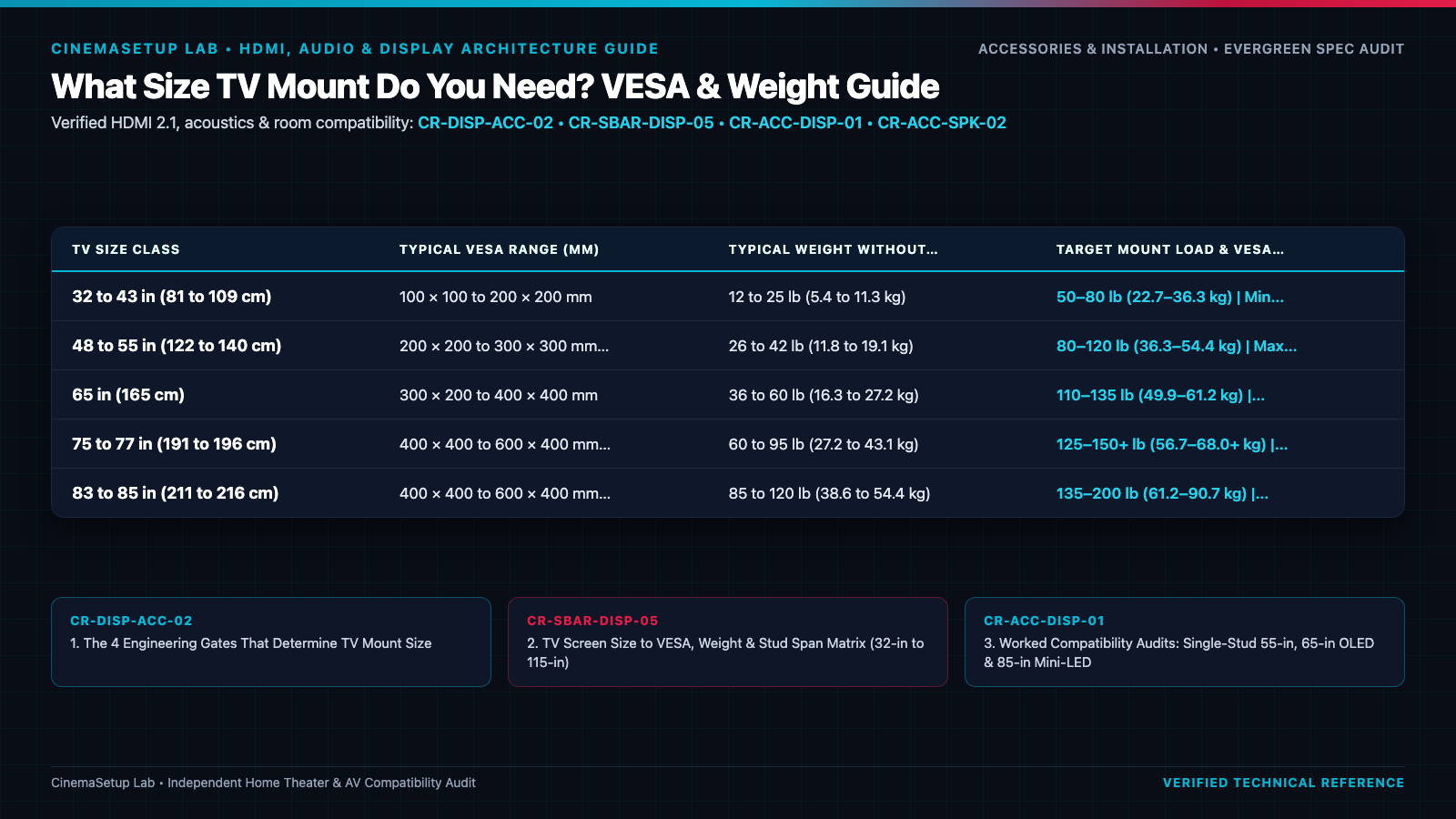
2. TV Screen Size to VESA, Weight & Stud Span Matrix (32-in to 115-in)
Use the reference matrix below as an engineering starting point to map your TV’s diagonal class to typical VESA ranges, stand-free weights, minimum mount load targets, and wall framing requirements. Because exact VESA coordinates and weights vary by series and model year, always confirm the exact figures on your television’s US spec sheet before ordering.
| TV Size Class | Typical VESA Range (mm) | Typical Weight Without Stand | Target Mount Load & VESA Cap | Recommended Stud Span & Type | Critical Compatibility Caveat |
|---|---|---|---|---|---|
| 32 to 43 in (81 to 109 cm) | 100 × 100 to 200 × 200 mm | 12 to 25 lb (5.4 to 11.3 kg) | 50–80 lb (22.7–36.3 kg) | Min VESA 100 × 100 mm | Single wood stud or masonry; full-motion or tilt | Avoid oversized mounts starting at 200 × 200 mm VESA—arms may peek past narrow bezels |
| 48 to 55 in (122 to 140 cm) | 200 × 200 to 300 × 300 mm (some 400 × 200) | 26 to 42 lb (11.8 to 19.1 kg) | 80–120 lb (36.3–54.4 kg) | Max VESA 400 × 400 mm | Single stud (if ≤80 lb arm) or 16 in (40.6 cm) dual-stud | OLEDs often use low-positioned 300 × 200 mm grids; check vertical rail overhang |
| 65 in (165 cm) | 300 × 200 to 400 × 400 mm | 36 to 60 lb (16.3 to 27.2 kg) | 110–135 lb (49.9–61.2 kg) | Max VESA 600 × 400 mm | Dual wood studs (16 in / 40.6 cm or 24 in / 61.0 cm) | Check HDMI port orientation on sub-1.5 in fixed mounts (CR-ACC-DISP-01) and soundbar gap |
| 75 to 77 in (191 to 196 cm) | 400 × 400 to 600 × 400 mm (some 300 × 200) | 60 to 95 lb (27.2 to 43.1 kg) | 125–150+ lb (56.7–68.0+ kg) | Max VESA 600 × 400 mm | Dual wood studs (16 in or 24 in) or solid concrete | Wide ~66–68 in panels limit swivel angles on short 15-in full-motion arms |
| 83 to 85 in (211 to 216 cm) | 400 × 400 to 600 × 400 mm (some 800 × 400) | 85 to 120 lb (38.6 to 54.4 kg) | 135–200 lb (61.2–90.7 kg) | Max VESA 600 × 400 or 800 × 600 mm | Dual wood studs (verify 24 in plate width if needed) | Many 125-lb arms top out near 85-in Mini-LED weights; verify exact stand-free lb |
| 98 to 115+ in (249 to 292+ cm) | 600 × 400 to 900 × 600 mm | 125 to 210+ lb (56.7 to 95.3+ kg) | 200–264 lb (90.7–119.7 kg) | Max VESA 800 × 600 or 900 × 600 mm | Wide multi-stud plate spanning 2–3 studs (16/24/32 in) | Standard 600 × 400 mm / 16-in mounts fail CR-DISP-ACC-02 HARD; use XXL rated hardware |
3. Worked Compatibility Audits: Single-Stud 55-in, 65-in OLED & 85-in Mini-LED
Running CR-DISP-ACC-02 against concrete room setups illustrates how quickly VESA grids, stud spacing, and accessory weights change the right mount size. All weight, clearance, and margin figures below are spec-sheet compatibility calculations using published rating assumptions rather than destructive lab measurements (G-03).
Worked Audit A: 55-Inch Bedroom TV on an Off-Center Single Stud
Suppose you are mounting a 55-inch bedroom LED/OLED TV in a corner where only one wood stud sits behind your ideal screen centerline. Checking the TV’s US spec sheet shows a 300 × 200 mm VESA pattern and a stand-free weight of 32 lb (14.5 kg).
- VESA Check (CR-DISP-ACC-02): Evaluating a compact single-stud arm rated for
100 × 100 mmthrough400 × 400 mm(such as the Amazon Basics B01KBEOL5E) confirms300 × 200 mmsits squarely inside the plate’s range. - Load & Stud Check: The arm is rated to
80 lb(36.3 kg) on a single wood stud—giving a2.5×working margin above the32 lbTV. Because a 55-inch TV is roughly48.3 in(122.7 cm) wide (half-width24.15 in), a16.3 in(41.4 cm) extension arm allows roughly 35° to 40° of inward corner swivel before the bezel meets the side wall. - Verdict: PASS on a single-stud
400 × 400 mm/80 lbarticulating mount.
Worked Audit B: 65-Inch Living-Room OLED Above a Dolby Atmos Soundbar
Now consider a main-room 65-inch OLED TV (such as an LG C6 or Samsung S90H series panel) with a 300 × 200 mm low-mounted VESA grid and an assumed stand-free weight of 42 lb (19.1 kg) (verify your exact size’s US manual), mounted on 16 in (40.6 cm) drywall studs above a Dolby Atmos soundbar (such as the Samsung HW-Q990H class) resting on a media console.
- VESA & Weight Check (CR-DISP-ACC-02): A
600 × 400 mmUL Listed dual-arm mount rated to125 lb(56.7 kg) (such as the ECHOGEAR EGLF2) easily covers300 × 200 mmand provides nearly3×working load headroom. - Soundbar & HDMI Clearance (CR-SBAR-DISP-05 & CR-ACC-DISP-01): Because the OLED’s VESA holes sit low on the back panel, install the vertical TV brackets using the upper mounting slots so rail ends do not drop below the bottom bezel. Mount the wall plate so the TV’s bottom edge sits
3.5 in(8.9 cm) above the soundbar’s top surface to clear up-firing Atmos drivers, and pull the dual arms out up to22.0 in(55.9 cm) whenever swapping 48 Gbps HDMI eARC or console cables. - Verdict: PASS (CONDITIONAL)—passes VESA and load, conditional on upper-slot rail placement and leaving 3+ inches above the soundbar.
Worked Audit C: 98-Inch Mini-LED on 24-Inch Stud Centers
Suppose a basement theater upgrades to an oversized 98-inch Mini-LED television weighing 145 lb (65.8 kg) without stand and using an 800 × 600 mm VESA grid on a wall framed with 24 in (61.0 cm) stud spacing.
- Why Standard Mounts Fail HARD: A popular living-room mount capped at
600 × 400 mmVESA,125 lb(56.7 kg), and16 instud centers fails all three gates of CR-DISP-ACC-02 simultaneously. - XXL Solution Audit: Switching to a heavy-duty XXL fixed plate rated for
264 lb(119.7 kg) and up to900 × 600 mmVESA with a39.57 in(100.5 cm) wide wall plate (such as the Mount-It! B0CXRGFVBN) spans two 24-inch studs cleanly with119 lbof spare load margin. Because its fixed profile sits just1.4 in(3.6 cm) from the drywall, pair it with side-facing TV HDMI ports, 90-degree certified adapters, or a recessed UL-listed media box. - Verdict: PASS on an XXL
900 × 600 mm/264 lbmulti-stud mount with recessed or side-entry HDMI clearance.
4. Myth vs. Engineering Reality: 5 TV Mount Sizing Mistakes
Myth vs. Engineering Reality — Verify These 5 Facts Before Drilling:
- Myth 1: “If my TV is 65 inches, any ’40–75 in’ mount fits automatically.”
Engineering Reality (CR-DISP-ACC-02): Screen size badges are rough approximations. A slim 65-inch OLED can use a300 × 200 mmVESA grid, whereas an older or heavy Mini-LED 65-inch set may require400 × 400 mmor exceed a budget bracket’s weight limit. Always match exact VESA millimeters and stand-free weight. - Myth 2: “Heavy-duty drywall toggle bolts work fine without hitting wood studs.”
Engineering Reality (G-27 Safety Rule): Drywall gypsum cannot safely resist cantilevered pull-out torque from articulating arms or heavy 55-to-98-inch displays. Follow the mount manufacturer’s instructions first by driving structural lag bolts into wood studs or maker-specified concrete/masonry anchors. - Myth 3: “Thinner ultra-slim fixed mounts are always better.”
Engineering Reality (CR-ACC-DISP-01): Fixed mounts between1.1 and 1.5 in(2.8 and 3.8 cm) leave virtually zero room for straight-back HDMI plugs or bulky power bricks, risking broken TV HDMI ports and kinked 48 Gbps cables unless you have side-facing inputs or a recessed wall box. - Myth 4: “You can ignore a 24-inch stud wall and just use one stud plus drywall anchors.”
Engineering Reality: Dual-stud wall plates are engineered to distribute weight across two vertical studs. Hanging a 75-inch TV on one lag-bolted side and hollow drywall anchors on the other creates uneven shear stress; buy a mount whose plate spans24 in(61.0 cm) natively. - Myth 5: “Mounting the TV high above a fireplace works cleanly as long as the mount tilts.”
Engineering Reality: Excessive downward tilt introduces off-axis contrast washout on VA LCD TVs and forces upward neck strain. Keep screen center close to seated eye level whenever possible, and verify full-motion or extendable mounts if you need easier cable access on flush walls.
5. Verified US TV Wall Mounts Matched by Size, VESA & Stud Span
Once you verify your TV’s VESA pattern, stand-free weight, and wall stud spacing, the four verified Amazon US mounts below cover every major size and framing class—from compact single-stud bedroom arms to 264 lb (119.7 kg) XXL fixed theater plates. For a wider eight-model comparative audit, see our roundup of the best TV wall mounts audited for VESA and load ratings.
1. Amazon Basics Full Motion Articulating Mount — Best Single-Stud Fit (26 to 55 in)

Key Audited Specs & Box Contents: TV Size: 26 to 55 in (66 to 140 cm) | Max Load: 80 lb (36.3 kg) | VESA Range: 100 × 100 mm to 400 × 400 mm | Profile & Reach: 2.6 in (6.6 cm) retracted to 16.3 in (41.4 cm) extended | Stud Fit: Single wood stud or solid concrete | In the Box: Single articulating TV wall mount kit (wall plate, swivel arm, TV mounting hardware pack; TV and cables sold separately) | Price Tier: Budget-Friendly Single-Stud Tier (under $50 bracket; verify live Amazon US pricing)
When a bedroom, home office, or apartment corner gives you only a single centered wood stud for a 32-to-55-inch television, dual-stud plates either miss the framing or stick out asymmetrically. The Amazon Basics Full Motion Articulating Mount (B01KBEOL5E) handles VESA grids from 100 × 100 mm up to 400 × 400 mm with an 80 lb (36.3 kg) load ceiling—covering virtually every modern 43-to-55-inch OLED and LED TV without stand while extending 16.3 in (41.4 cm) for corner angling.
Pros
- Single-stud wall plate fits tight corners and off-center stud framing cleanly
- Covers compact 100 × 100 mm through 400 × 400 mm VESA patterns with 16.3 in (41.4 cm) reach
Cons
- 80 lb (36.3 kg) single-stud limit and 400 × 400 mm VESA cap exclude 65-inch+ main theater TVs
- Only 5 degrees of downward tilt (-5° / +10°) limits overhead glare correction
Warranty & Seller Check (G-26): Verify purchase from Amazon.com as the direct seller at checkout to retain Amazon Basics limited warranty coverage, and follow all single-stud lag-bolt centering instructions.
2. Mounting Dream Tilting Mount (MD2268-LK) — Best 16/18/24-in Stud Fit (37 to 90 in)
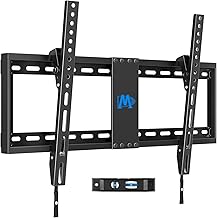
Key Audited Specs & Box Contents: TV Size: 37 to 90 in (94 to 229 cm) | Max Load: 132 lb (59.9 kg) | VESA Range: 200 × 100 mm to 600 × 400 mm | Profile & Tilt: 1.5 in (3.8 cm) low-profile stance, up to 8 deg forward tilt | Stud Fit: 16 in (40.6 cm), 18 in (45.7 cm), or 24 in (61.0 cm) wood studs, concrete, or brick | In the Box: Single tilting TV wall mount kit (wide wall plate, vertical brackets, lag bolts, TV screw pack; TV and angled HDMI adapters sold separately) | Price Tier: Budget-Friendly Tilting Tier (under $50 bracket; verify live Amazon US pricing)
If your seating sits straight across from the TV and you want a slim 1.5 in (3.8 cm) profile with slight downward glare tilt, the Mounting Dream MD2268-LK (B00NKYYMAW) solves the most frequent installation surprise: wide 24 in (61.0 cm) wall studs. Supporting 16 in, 18 in, and 24 in wood stud centers alongside 200 × 100 mm through 600 × 400 mm VESA grids and 132 lb (59.9 kg) capacity, it fits the vast majority of 55-to-85-inch living-room TVs—just pre-connect your 48 Gbps HDMI cables before latching because rear wall clearance is tight.
Pros
- Wide wall plate spans 16 in, 18 in, and 24 in (40.6, 45.7, and 61.0 cm) wood studs natively
- 132 lb (59.9 kg) load limit and 600 × 400 mm VESA range at an under-$50 budget tier
Cons
- No pull-out scissor extension; rear-facing HDMI plugs face tight 1.5 in (3.8 cm) clearance
- Lacks an advertised UL 2442 certification mark and offers zero lateral swivel
Warranty & Seller Check (G-26): Confirm purchase from the official Mounting Dream Amazon storefront or Amazon.com to maintain US hardware replacement and manufacturer customer support.
3. ECHOGEAR MaxMotion (EGLF2) — Best UL Listed Full-Motion Fit (42 to 90 in)

Key Audited Specs & Box Contents: TV Size: 42 to 90 in (107 to 229 cm) | Max Load: 125 lb (56.7 kg) — UL Listed | VESA Range: 200 × 100 mm to 600 × 400 mm | Profile & Reach: 2.40 in (6.1 cm) retracted to 22.0 in (55.9 cm) extended | Motion: 130 deg total swivel, +5/-15 deg tilt | Stud Fit: 16 in (40.6 cm) wood studs or solid concrete | In the Box: Single UL Listed dual-arm full-motion mount kit (wall plate, drilling template, sorted hardware bags, cable clips; TV and CL2/CL3 HDMI cables sold separately) | Price Tier: Mid-Range UL Listed Full-Motion Tier ($100-$170 bracket; verify live Amazon US pricing)
For wide living rooms with off-axis seating or frequent HDMI 2.1 cable swaps behind an OLED or Mini-LED panel, the ECHOGEAR MaxMotion EGLF2 (B073QX1ZMS) delivers verified UL Listed mechanical safety alongside 22.0 in (55.9 cm) of dual-arm extension. Its 200 × 100 mm to 600 × 400 mm VESA coverage and 125 lb (56.7 kg) load ceiling handle virtually every 55-to-83-inch TV smoothly, while the 2.40 in (6.1 cm) retracted profile still leaves breathing room for angled rear connectors.
Pros
- Official UL Listed certification with a 125 lb (56.7 kg) working load rating and 5-year US warranty
- 22.0 in (55.9 cm) dual-arm extension grants effortless rear HDMI access and 130-degree swivel
Cons
- Wall plate is sized for standard 16 in (40.6 cm) stud centers rather than 24 in (61.0 cm) framing
- Maximum 600 × 400 mm VESA grid excludes oversized 800 × 600 mm XXL displays
Warranty & Seller Check (G-26): Verify Amazon.com or ECHOGEAR’s authorized US storefront as the seller so ECHOGEAR’s 5-year limited US warranty applies cleanly.
4. Mount-It! Heavy Duty XXL Fixed Mount — Best for 85 to 120 in & 900×600 mm VESA

Key Audited Specs & Box Contents: TV Size: 60 to 120 in (152 to 305 cm) | Max Load: 264 lb (119.7 kg) | VESA Range: 50 × 50 mm to 900 × 600 mm (26 patterns) | Profile: 1.4 in (3.6 cm) ultra-low fixed depth | Stud Fit: 39.57 in (100.5 cm) wide multi-stud plate (16 in, 24 in, or 32 in studs & concrete) | In the Box: Single XXL fixed wall mount kit (wide reinforced wall plate, vertical TV rails, integrated bubble level, lag bolts; TV and recessed AV box sold separately) | Price Tier: Mid-Range Heavy-Duty XXL Tier ($60-$120 bracket; verify live Amazon US pricing)
Once you step into 85-to-115-inch flagship Mini-LED or commercial-grade displays, standard 600 × 400 mm living-room plates often fail both VESA width and weight margins. The Mount-It! Heavy Duty XXL Fixed Mount (B0CXRGFVBN) expands VESA support all the way to 900 × 600 mm with a 264 lb (119.7 kg) load ceiling and a 39.57 in (100.5 cm) steel wall plate capable of spanning two or three structural studs (16, 24, or 32 inches apart) for rock-solid eye-level theater placement.
Pros
- 264 lb (119.7 kg) capacity and 900 × 600 mm VESA range cover 85-to-120-inch displays
- 39.57 in (100.5 cm) wide plate spans 16 in, 24 in, or 32 in stud layouts cleanly
Cons
- Fixed 0-degree tilt requires exact seated eye-level wall height during installation
- 1.4 in (3.6 cm) wall gap requires side-entry TV inputs, 90-degree adapters, or a recessed box
Warranty & Seller Check (G-26): Verify purchase from Mount-It! US or Amazon.com directly at checkout, and plan for a two-to-three-person lift when hanging 100+ lb panels.
6. Structural Anchoring, Bolt Depth & CL2/CL3 In-Wall Safety
Safety, Wall Anchoring & In-Wall Cable Compliance Notice (G-27 / CR-DISP-ACC-02 / CR-ACC-DISP-01 / CR-ACC-SPK-02):
- Manufacturer-Instruction-First Wall Anchoring: Always follow the mount manufacturer’s installation instructions first. Locate structural wood studs accurately with a calibrated stud finder (or follow maker concrete/masonry anchor specs on solid walls), drill exact pilot holes, and seat lag bolts dead-center into solid framing—never rely on hollow drywall anchors alone for heavy TVs or articulating arms.
- Metal Stud & Plaster Framing Caveats: Standard wood lag bolts must not be driven into thin-gauge steel studs or lath-and-plaster without specialized framing hardware explicitly approved by the mount manufacturer, or professional wall reinforcement.
- UL CL2 / CL3 In-Wall HDMI & Speaker Wire Rules: Whenever routing HDMI cables or speaker wire inside drywall behind a wall-mounted display, use exclusively UL-listed CL2 or CL3 (or local-code-equivalent) in-wall-rated cable—including Ultra High Speed HDMI Certified cables for 4K120 consoles/AVRs (CR-ACC-DISP-01) and CL2/CL3 speaker wire (CR-ACC-SPK-02). Never conceal a television’s standard flexible AC power cord inside a wall cavity.
- Licensed Electrician & Pro AV Installer Referrals: For recessed 120V AC outlets behind flush mounts, metal-stud commercial framing, brick fireplace chimneys, or oversized 85-to-120-inch panels, consult a licensed electrician or licensed AV installer in your jurisdiction. Keep external speaker and soundbar playback at comfortable listening levels.
7. Authoritative Standards & Manufacturer References
- VESA Flat Display Mounting Interface (FDMI) Standard: Video Electronics Standards Association specifications governing millimeter bolt spacing (100 × 100 mm through 900 × 600 mm) and metric M4/M6/M8 fastener classes at vesa.org.
- UL 2442 Wall & Ceiling Mount Safety Standard: UL Solutions certification framework evaluating static working load margins and mechanical locking integrity for consumer display brackets at ul.com.
- HDMI Licensing Administrator (48 Gbps Certification): Official Ultra High Speed HDMI Cable Certification program and connector bend-clearance considerations for 4K120/eARC wall mounts at hdmi.org.
- Manufacturer Wall-Plate & Load Documentation: Official US specification sheets from ECHOGEAR (echogear.com), Mounting Dream (mountingdreamonline.com), and Mount-It! (mount-it.com).
How We Audited This Guide
- Installation cabling and hardware were verified across HDMI Ultra High Speed QR certification vs. active fiber directionality, CL2/CL3 UL in-wall cable ratings, VESA/weight wall-mount limits, and UST ALR vs. standard screens.
- Every AV receiver, speaker, subwoofer, soundbar, OLED/Mini-LED TV, projector, source player, and accessory spec was cross-checked against official manufacturer manuals, CEA/CTA standards, and live Amazon US listings.
- Recommendations were evaluated against our weighted vertical scoring rubrics and documented CR-* compatibility rules; we never invent nits, contrast ratios, bench wattage, or room decibels.
Continue Your Audit
8. Frequently Asked Questions
How do I know what size TV wall mount I need?
Check your TV’s US spec sheet for two figures under CR-DISP-ACC-02: its millimeter VESA hole pattern (such as 300 × 200 or 400 × 400 mm) and its weight without stand in pounds. Then confirm your wall’s stud spacing (16 in or 24 in) matches the mount’s wall plate.
Do all 65-inch TVs use the same VESA mount size?
No. Many 65-inch OLED displays use a low-positioned 300 × 200 mm VESA grid and weigh roughly 36 to 48 lb (16.3 to 21.8 kg) without stand, while thicker 65-inch Mini-LED sets often use 400 × 400 mm or 400 × 300 mm holes and weigh noticeably more.
Is a 400×400 mount compatible with a 300×200 VESA TV?
Usually yes, provided 300 × 200 mm falls between the mount’s stated minimum and maximum VESA pattern. Check the bracket’s vertical rail length too—on OLEDs with low-mounted 300 × 200 mm holes, long 400-mm rails may hang below the bottom bezel unless mounted using upper slots.
What size TV mount do I need for 24-inch wall studs?
Standard 16-inch full-motion wall plates cannot span 24 in (61.0 cm) wood studs safely. Choose a wide dual-stud bracket whose specification sheet explicitly lists 24-inch stud spacing—such as the Mounting Dream MD2268-LK or Mount-It! XXL wide-plate designs.
How much weight margin should a TV wall mount have?
Under CR-DISP-ACC-02, the mount’s rated maximum load must always exceed your TV’s stand-free weight. Choosing a UL Listed bracket rated at least 25% to 50% above your TV’s weight without stand limits arm sag and adds margin for soundbar brackets or future upgrades.
Will an ultra-slim fixed TV mount block my HDMI 2.1 cables?
It can if your TV’s ports point straight backward. Ultra-slim 1.1-to-1.5-inch mounts leave minimal rear room for stiff 48 Gbps Ultra High Speed HDMI plugs (CR-ACC-DISP-01), so use side-facing ports, 90-degree adapters, an extendable tilt mount, or a recessed UL-listed wall box.


