
Seeing a fiber hdmi cable no signal message after fishing a long run behind drywall or up to a ceiling projector is deeply frustrating—especially because an Active Optical Cable (AOC) behaves completely differently from a passive copper HDMI cord. Inside every fiber optic HDMI cable sit miniature laser transmitters, optical photodiodes, and copper sub-conductors that depend on exact one-way orientation, stable 5 V port power, and clean unpinched glass fibers to complete a video and audio handshake.
As outlined in our best home theater accessories hub, roughly four out of five AOC dropouts happen without a single broken wire—caused instead by reversed Source/Display ends, inline wall-plate couplers sapping 5 V rail current, or unconfigured 40/48 Gbps display ports. Work through the ordered, lowest-risk diagnostic steps below to isolate whether your fault sits at the connector hood, power rail, port menu, or wall cavity before pulling new cable.
Safety, Wall-Mount & In-Wall Wiring Notice Before Troubleshooting: Always power down your television, projector, AV receiver, and source devices completely before unplugging or reseating fiber optic HDMI hoods—live hot-plugging can send voltage spikes into sensitive VCSEL laser transceivers. Whenever accessing ports behind a wall-mounted display, follow the manufacturer’s installation instructions, verify the bracket supports the TV’s VESA pattern and weight without the stand (CR-DISP-ACC-02), and confirm hardware is anchored into wood studs or rated masonry. Under rule CR-ACC-SPK-02 and NFPA 70 (National Electrical Code), never conceal non-rated cords inside walls; any HDMI cable routed inside walls, ceilings, or drop plenums must carry an Underwriters Laboratories (UL) CL2, CL3, or CMP plenum rating and satisfy local building codes. Never run standard AC power cords inside drywall cavities, and always consult a licensed electrician or qualified low-voltage AV installer before cutting drywall, drilling studs, or re-pulling concealed runs near electrical circuits. Keep master volume at a comfortable listening level whenever verifying audio channels or running receiver level-calibration tones.
In This Diagnostic Playbook
- Fast Symptom-to-Cause Triage Table
- How Hybrid Fiber HDMI Works: Optical Video vs Copper 5 V & eARC
- 8-Step Ordered Recovery Workflow (Lowest Risk First)
- Wall Plates, Couplers & CL2/CL3/CMP Routing Comparison
- Post-Fix Verification Checklist
- Official Technical Standards & Manufacturer Citations
- Frequently Asked Questions
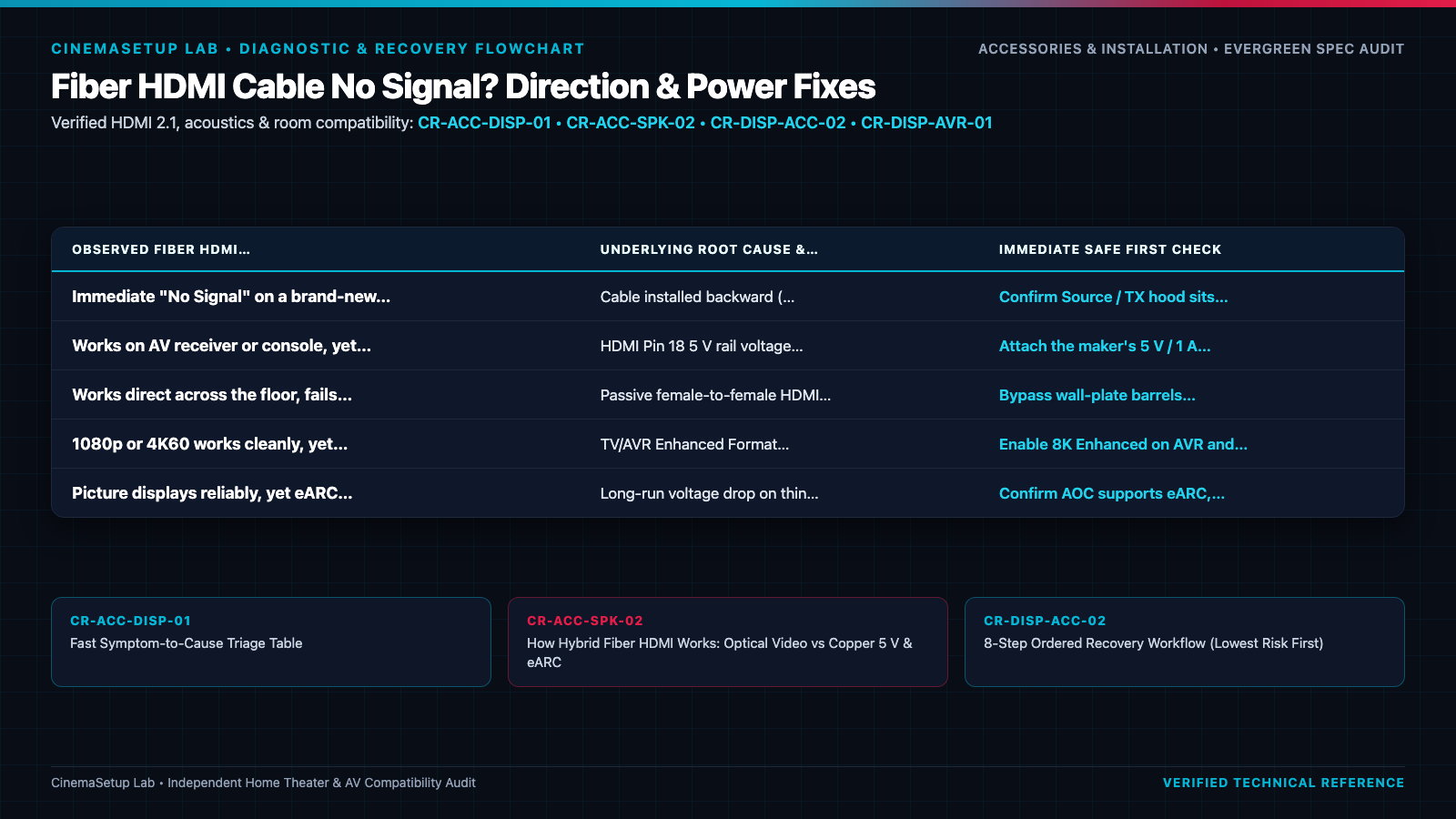
Fast Symptom-to-Cause Triage Table
Because fiber optic HDMI cables split video, 5 V power, and audio return across separate internal pathways, the exact way your signal fails tells you where to look first. Match your observed behavior to the governing compatibility rule and safest immediate check below.
| Observed Fiber HDMI Symptom | Underlying Root Cause & Rule Trigger | Immediate Safe First Check |
|---|---|---|
| Immediate “No Signal” on a brand-new installation | Cable installed backward (ISS-ACC-FIBER-DIRECTION) or detachable Micro-HDMI plug unseated | Confirm Source / TX hood sits at player or AVR output and Display / RX sits at TV or projector; reseat any detachable head. |
| Works on AV receiver or console, yet blanks out on PC, laptop, or streaming stick | HDMI Pin 18 5 V rail voltage sag below ~4.7 V or insufficient current for optical laser chips | Attach the maker’s 5 V / 1 A USB power injector to a clean wall adapter and remove passive barrel couplers. |
| Works direct across the floor, fails once routed through wall plates | Passive female-to-female HDMI keystone couplers or 90-degree elbows drop 5 V power and add FRL reflection loss | Bypass wall-plate barrels completely with a direct run through a brush pass-through plate. |
| 1080p or 4K60 works cleanly, yet 4K120 / HDR triggers “No Signal” | TV/AVR Enhanced Format disabled, legacy 18 Gbps AOC, or counterfeit uncertified cable (CR-ACC-DISP-01, ISS-ACC-FAKE-HDMI-CERT) | Enable 8K Enhanced on AVR and Deep Color / Input Signal Plus on TV; swap to an official UHS 48 Gbps AOC if cable is older. |
| Picture displays reliably, yet eARC audio or CEC fails | Long-run voltage drop on thin copper eARC/CEC sub-wires inside hybrid cable, or TV audio menu misset (CR-DISP-AVR-01) | Confirm AOC supports eARC, enable Pass Through on TV, or route sources directly to AVR rather than returning eARC across 50 ft+ (15.2 m+). |
| Intermittent sparkles, pink snow, or blackout when tilting wall mount | Glass fiber bent tighter than ~2 in (5 cm) radius behind mount or kinked during pull (CR-DISP-ACC-02) | Loosen rear mount pinch immediately; if sparkles persist on a straight floor run, replace the damaged cable. |
| Blank screen after switching inputs or waking from standby | Stale EDID/HDCP 2.3 cache or display powering up before source 5 V rail wakes optical transmitter | Cold-cycle AC power for 60 seconds, then boot display/AVR before waking the source (or vice versa per maker manual). |
How Hybrid Fiber HDMI Works: Optical Video vs Copper 5 V & eARC
Traditional passive HDMI cables up to 10 ft (3 m) rely purely on copper twisted pairs, meaning either end can plug into either device and power draws are negligible. Above roughly 10 to 16 ft (3 to 4.9 m) at 48 Gbps Fixed Rate Link (FRL) speeds, copper resistance and skin-effect attenuation erase the high-frequency digital eye pattern before it reaches your display (CR-ACC-DISP-01). Hybrid Active Optical Cables solve that distance ceiling—running cleanly across 30 ft to 75 ft (9.1 m to 22.9 m) or farther—by converting electrical signals into pulses of infrared laser light inside the HDMI connector hoods.
Crucially, fiber optic HDMI cables are hybrids, not pure glass. Inside the jacket, four optical fiber strands carry the unidirectional high-speed TMDS or FRL video and primary forward audio channels, while several thin 28 to 32 AWG copper wires run alongside them to handle low-speed bidirectional handshakes and power. When a fiber HDMI cable shows no signal, one of those two internal networks has stalled:
| Internal AOC Pathway | Physical Medium | Directionality | What Fails When Interrupted |
|---|---|---|---|
| High-Speed Video & Forward Audio (FRL / TMDS) | 4 glass or polymer optical fibers + VCSEL laser TX / photodiode RX | Strictly one-way (Source → Display) | Instant “No Signal” if reversed (ISS-ACC-FIBER-DIRECTION), sparkles if glass fractures, or 60 Hz fallback if lasers cap at 18 Gbps. |
| HDMI 5 V Power Rail (Pin 18) | Copper wire drawing 5 V from the source device’s HDMI output | Source → Cable chips (both hoods) | Optical laser and receiver chips starve if source drops below ~4.7 V or couplers add resistance, causing blackouts or boot loops. |
| EDID / DDC & HDCP 2.3 Encryption | Copper I2C data wires + Hot Plug Detect (HPD) pin | Bidirectional handshake | Display never receives video timings or drops protected 4K Netflix/UHD Blu-ray streams to blank screens (CR-SRC-AVR-02). |
| eARC / ARC & HDMI-CEC Control | Thin copper sub-conductors (typically 28–32 AWG) | Display → AVR/Soundbar (eARC) | 4K120 video plays fine, yet Dolby Atmos over eARC drops out or CEC volume/power commands misfire over long 50–75 ft (15.2–22.9 m) spans. |
8-Step Ordered Recovery Workflow (Lowest Risk First)
Work through these eight steps in strict order. You will rule out zero-cost orientation errors, inline voltage-drop culprits, and display menu locks before ever touching drywall or ordering replacement cable.
Step 1: Verify Source-to-Display Orientation & Detachable Micro-HDMI Hoods (ISS-ACC-FIBER-DIRECTION)
Under knowledge-model issue ISS-ACC-FIBER-DIRECTION, reversing a directional AOC is the single most common reason a freshly installed cable shows zero picture. Power off your display and source, then inspect the molded plastic or zinc-alloy connector shells closely with a flashlight:
- Source End Markings: Must read
Source,TX,Input, or carry an arrow pointing away from the plug. This hood contains the VCSEL laser transmitter and belongs in your streaming box, PlayStation 5, 4K Blu-ray player, or AV receiver’sHDMI OUT(Monitor Out) jack. - Display End Markings: Must read
Display,RX,TV/Projector, orOutput. This hood houses the optical photodiode receiver and belongs in the television or projector’sHDMI INport. - Check eARC Directional Exceptions: In a standard setup where a TV sends eARC audio back down the same long cable to a wall-remote AV receiver or soundbar, you still orient
Sourceat the AVR/soundbar andDisplayat the TV—eARC flows backward over the internal copper wires, not the one-way laser fibers. (Only dedicated “eARC-only” reverse cables flip that labeling; always follow the printing on your specific jacket.) - Inspect Detachable Micro-HDMI Heads: If you pulled a conduit-friendly cable with a removable Type-A shell revealing a smaller Type-D (Micro-HDMI) plug, pop the outer shell open and confirm the Micro-HDMI plug is clicked completely flush into the optical PCB board. Even a 0.04 in (1 mm) pull-out breaks Pin 18 power or Hot Plug Detect.
Step 2: Remove Passive Wall-Plate Couplers, 90-Degree Elbows & Inline Switches
If your cable is oriented properly yet still shows no signal, unplug both ends from any wall-plate keystone jack, female-to-female barrel coupler, right-angle swivel adapter, or HDMI splitter and wire the fiber cord straight from source to display. Passive barrel couplers are notorious killers of 48 Gbps AOC links for two engineering reasons:
- Pin 18 Voltage Drop: Each extra mechanical contact point adds contact resistance, pulling the source’s 5 V rail below the ~4.7 V threshold required to keep the VCSEL laser driver and receiver clock locked.
- Impedance Discontinuity & HDCP/FRL Reflections: Cheap keystone barrels are rarely rated for 48 Gbps FRL signaling or clean HDCP 2.3 rise times (
CR-SRC-AVR-02). Even an 18 Gbps capture card, Hue Sync Box, or PSVR1 breakout box inline will strip high-bandwidth handshakes—a behavior we audit closely in our PS5 4K 120Hz signal-chain recovery guide.
If bypassing a wall plate instantly restores the picture, replace the keystone barrel with an open brush-style pass-through plate so the continuous fiber cable plugs straight into the AV gear.
Step 3: Resolve 5 V Rail Starvation with an External USB Power Injector
An Active Optical Cable consumes roughly 200 to 400 mW of DC power continuously to run its optical lasers and photodetectors. While the HDMI specification requires sources to output 5 V at a minimum of 55 mA, many AV receivers, gaming consoles, and modern graphics cards comfortably supply 150 to 300 mA—whereas ultra-thin laptops, streaming dongles, Nintendo Switch docks, USB-C HDMI adapters, and certain projectors cut corners on Pin 18 current limits. That explains why a fiber HDMI cable works perfectly on a desktop GPU yet flashes “No Signal” on a streaming stick or older projector.
- Locate the Maker’s USB Power Pigtail: Many 50 ft to 75 ft (15.2 m to 22.9 m) AOCs include a Micro-USB or USB-C power port built into the
Display(or occasionallySource) hood, or ship with a short HDMI-plus-USB-A voltage injector dongle. Follow the cable manufacturer’s exact instructions on which end accepts auxiliary 5 V power—never force an unapproved voltage injector onto a cable not designed for it. - Use a Clean 5 V / 1 A AC USB Wall Adapter: Avoid plugging the USB power pigtail into the television’s own rear USB service port when diagnosing “No Signal.” Many TVs de-energize or pulse their USB ports during standby and input switching, dropping the optical receiver right when the source tries to read EDID. A UL-listed 5 V / 1 A USB wall brick plugged into the same surge strip keeps the optical transceiver awake continuously.
- Watch for Back-Feed Lockups: If your TV or projector stays dimly powered or refuses to enter sleep mode while an auxiliary USB power adapter is attached, verify your cable’s manual or use a switched power strip controlled by the AVR’s 12 V trigger or Eco outlet.
Step 4: Unlock High-Bandwidth HDMI Formats & Match Display Refresh Caps (CR-ACC-DISP-01, CR-SRC-DISP-02, CR-SRC-AVR-01)
Often the fiber cable is transmitting light cleanly, yet the display or AV receiver rejects the incoming 4K/120Hz or 10-bit HDR FRL stream because its port defaults to legacy 18 Gbps mode—producing a blank “No Signal” or “Unsupported Format” screen whenever high-bandwidth content launches. Check every hop in the video chain:
- AV Receiver Output & Input Mode (
CR-SRC-AVR-01): On modern 40 Gbps receivers like the Denon AVR-X3900H, all rear HDMI inputs support 40 Gbps 8K/4K120 switching, yet Denon and Marantz units ship set toEnhanced(18 Gbps) rather than 8K Enhanced (40 Gbps). Navigate to Setup > Video > 4K/8K Signal Format and toggle the active input to8K Enhanced(or8K Modeon Yamaha AVRs). If you route an older 18 Gbps fiber cord through an8K EnhancedAVR setting, drop the source temporarily to4K/60Hzto confirm whether the cable itself lacks 48 Gbps FRL bandwidth. - Television Enhanced Port Settings (
CR-SRC-DISP-02): On an LG C6 OLED, enable HDMI Deep Color (4K) for that specific HDMI input; on a Samsung S90H OLED, enable Input Signal Plus; on Sony Bravia sets, choose Enhanced format (VRR) for consoles or Enhanced format (Dolby Vision) for 4K/60Hz movie players. - Projector 60 Hz Controller Caps: Remember that most home theater projectors use 60 Hz controllers at native or pixel-shifted 4K (`3840×2160`). Sending a 4K/120Hz signal down a fiber cable to a 4K/60Hz projector triggers an immediate “No Signal” screen even on a flawless cable—force the source output to
4K/60Hz(or1080p/120Hzif supported).
Step 5: Cold-Cycle AC Power in Strict Boot Order to Flush EDID & HDCP 2.3 Caches
Because an AOC contains active microcontrollers inside both connector hoods, soft standby mode rarely resets a hung optical link. When EDID tables or HDCP 2.3 keys lock up, the microcontrollers stay powered in a crashed state as long as 5 V leaks from the source:
- Power off the source, AV receiver, and TV/projector completely, then unplug all devices (and any USB 5 V cable injector) from AC power for 60 seconds so capacitors discharge fully.
- Reseat both fiber HDMI connector hoods squarely—heavy long runs hanging down from a rear TV jack can torque the connector slightly out of alignment; add a light Velcro strain-relief tie to the TV mount arm so weight never hangs on the HDMI socket.
- Plug AC cords back in and boot from the display backward: turn on the TV or projector first, wait 10 seconds for its HDMI input to initialize, power on the AV receiver second, and wake the source device last so the display’s EDID table is ready the instant Pin 18 energizes the AOC transmitter.
Step 6: Isolate Long-Run eARC, ARC & CEC Copper Sub-Wire Dropouts (CR-DISP-AVR-01, CR-SYS-03)
A frequent quirk in living rooms and projector setups is seeing crisp 4K/60Hz or 4K/120Hz picture over a 50 ft (15.2 m) fiber HDMI cable while audio refuses to return from the TV to an AV receiver or flagship soundbar like the Samsung HW-Q990H (CR-DISP-AVR-01). Remember that eARC/ARC audio and CEC control travel on thin copper sub-wires inside the AOC—not on the glass fibers.
- Confirm Cable eARC Support: Older 18 Gbps fiber cables often wire standard ARC only (or omit eARC shielding altogether), blocking lossless Dolby TrueHD Atmos and multichannel LPCM.
- Check Shared Port Assignment & One-Device Limit (
CR-SYS-03): Confirm the cable plugs into the TV’s single labeledeARCjack, set TV Digital Audio Output toPass Through(notPCM), and verify only one audio system handles return audio. - Tame CEC Conflicts & Length Drops: If CEC keeps crashing the video handshake on runs over 50 ft (15.2 m), toggle HDMI-CEC (
Anynet+,SimpLink,Bravia Sync) off temporarily to verify whether CEC crosstalk is breaking video sync. For projector rooms where eARC fails over 50–75 ft (15.2–22.9 m), plug streaming sticks and players straight into your AV receiver so video travels one-way up the fiber cable to the projector and audio stays locally inside the AVR rack.
Step 7: Audit Bend Radius, Wall-Mount Pinching & Fractured Glass Fibers (CR-DISP-ACC-02, CR-ACC-SPK-02)
If none of Steps 1 through 6 restore a clean image, inspect the physical path of the cable for mechanical fiber damage. Unlike copper wire, which tolerates sharp 90-degree staple folds, optical glass strands fracture permanently if pinched beyond their minimum bend radius:
- Respect Minimum Bend Clearances: Most residential AOC makers specify a minimum static bend radius of roughly 0.8 to 2.0 in (2 to 5 cm)—meaning the loop behind a flush wall-mounted TV bracket must form a gentle curve about the width of a soda can rather than a sharp crease against drywall.
- Check Articulating TV Mounts: Full-motion wall arms can scissor or pinch an AOC jacket when pushed flat against the wall, producing blackouts or pink/green pixel sparkles whenever the screen tilts.
- Verify with a Short Copper Baseline: Before blaming your TV or receiver, temporarily connect the source and display with a known-good passive Ultra High Speed copper cable under 10 ft (3 m)—our best HDMI cables for 4K 120Hz guide details how to spot verified 48 Gbps copper cords. If the short copper cord locks 4K/120Hz HDR immediately while the fiber run stays dark after orientation, coupler bypass, and 5 V USB injection checks, the fiber cable’s internal glass core or transceiver IC has failed. Never attempt to splice a broken fiber HDMI cord; consult a licensed low-voltage installer to pull a fresh UL
CL2,CL3, orCMPplenum replacement through conduit or wall bays (CR-ACC-SPK-02).
Step 8: Separate Uncertified “8K” Clones from Official Ultra High Speed AOCs & Update Firmware
Marketplace audits reveal widespread “8K / 48 Gbps” fiber HDMI listings that lack official HDMI Forum Ultra High Speed certification (ISS-ACC-FAKE-HDMI-CERT). Many are repurposed 18 Gbps optical engines paired with unshielded copper sub-wires that pass 1080p or 4K/60Hz SDR cleanly yet drop to “No Signal” when VRR, ALLM, or 40–48 Gbps 4K/120Hz engages. Always scan the holographic QR label on the packaging with the official HDMI Cable Certification app before sealing drywall, or consult our audited picks in the best fiber optic HDMI cables guide. Finally, check for TV, projector, and AVR firmware updates—display makers routinely patch FRL optical handshake timing tolerances via firmware.
Wall Plates, Couplers & CL2/CL3/CMP Routing Comparison
How you terminate a fiber optic HDMI cable at the wall directly determines both signal reliability and US residential fire-code compliance (CR-ACC-SPK-02). Compare the four common termination approaches before modifying drywall or installing new runs:
| Wall Routing / Termination Method | 5 V Rail & 48 Gbps Impact | Code & Safety Requirement (CR-ACC-SPK-02) | Recommended Verdict |
|---|---|---|---|
| Brush / Recessed Pass-Through Wall Plate | Zero insertion loss; continuous uninterrupted fiber run from source to display | Cable inside wall must carry UL CL2, CL3, or CMP rating; keep low-voltage bays separate from 120 V AC wiring | Best Practice: Preserves 5 V Pin 18 stability and full 48 Gbps FRL margin. |
| Smooth 1.25–1.5 in (3.2–3.8 cm) Smurf-Tube Conduit | Protects glass strands from drywall screws and allows future upgrades without opening walls | Use sweep elbows (≥4 in / 10 cm pull radius) and padded pull socks; never yank by connector hood | Ideal for Remodels: Prevents bend-radius fractures and eases future swaps. |
| Paintable Surface Cord Raceway | Zero wall cuts (renter-safe); keeps bend radius visible around room corners | Follow raceway maker surface-prep instructions; maintain clearance from baseboard heaters and AC cords | Best Rental Option: Zero drywall alteration and instant cable replacement. |
| Female-to-Female Keystone Coupler Plate | High failure risk: saps 5 V Pin 18 voltage, breaks HPD timing, and introduces 48 Gbps FRL reflections | Requires dual CL2/CL3 segments inside wall plus external patch cords | Avoid for Fiber AOC: Bypass barrels immediately when diagnosing “No Signal.” |
Post-Fix Verification Checklist
Once your picture returns, run through these four quick checks to verify the fiber HDMI chain holds under real playback loads rather than just an idle home menu:
- Verify Full-Bandwidth Lock: Trigger your highest-demand format—such as
4K/120HzHDR VRR from a console or 4K UHD Blu-ray playback at 24 Hz HDR—and confirm zero sparkles, snow, or 2-second blackouts over five minutes of viewing. - Confirm Audio & Lip-Sync Alignment (
CR-DISP-AVR-01,CR-SYS-04): Check that multi-channel Dolby Atmos or surround audio plays cleanly without dropouts and lip-sync matches dialogue; adjust AVR/TV audio delay if voices lag video. - Verify Standby & Wake Reliability: Put the TV and source to sleep for two minutes, then wake them back up to confirm the AOC re-acquires Hot Plug Detect and 5 V power automatically without needing a manual unplug.
- Check Comfortable Volume & Strain Relief (
G-27): Keep master volume at a comfortable listening level when verifying surround channels or running receiver level-calibration tones, and confirm the heavy cable weight is relieved off the HDMI socket via a loose tie on the mount or rack rail.
Official Technical Standards & Manufacturer Citations
- HDMI Licensing Administrator (HDMI Forum): HDMI 2.1a Specification, Pin 18 +5V Power Supply & Ultra High Speed HDMI Cable Certification Program — defines FRL signaling up to 48 Gbps, source 5 V rail current obligations, eARC electrical transport, and official QR hologram verification (hdmi.org).
- National Electrical Code (NFPA 70 Article 725 / UL 444 & UL 13): CL2, CL3, and CMP Plenum Low-Voltage Cable Fire-Resistance Ratings — US safety standard governing concealed HDMI and low-voltage cables inside residential walls, ceilings, and air-handling spaces (nfpa.org).
- Denon / LG / Samsung US Support Documentation: 4K/8K Signal Format (8K Enhanced), LG HDMI Deep Color, and Samsung Input Signal Plus Setup References — manufacturer guidance for enabling 40–48 Gbps FRL handshakes and eARC Pass Through (support.denon.com).
- Monoprice / Active Optical HDMI Engineering Notes: Directional Source/Display AOC Installation, Minimum Bend Radius & External 5 V USB Power Injection Guidelines — manufacturer install tolerances for long-run hybrid optical HDMI cords (monoprice.com).
How We Audited This Guide
- Installation cabling and hardware were verified across HDMI Ultra High Speed QR certification vs. active fiber directionality, CL2/CL3 UL in-wall cable ratings, VESA/weight wall-mount limits, and UST ALR vs. standard screens.
- Every AV receiver, speaker, subwoofer, soundbar, OLED/Mini-LED TV, projector, source player, and accessory spec was cross-checked against official manufacturer manuals, CEA/CTA standards, and live Amazon US listings.
- Recommendations were evaluated against our weighted vertical scoring rubrics and documented CR-* compatibility rules; we never invent nits, contrast ratios, bench wattage, or room decibels.
Continue Your Audit
Frequently Asked Questions
Do fiber optic HDMI cables only work in one direction?
Yes. Standard Active Optical HDMI cables are unidirectional because the VCSEL laser transmitter sits exclusively in the Source hood and the photodiode receiver sits in the Display hood. Installing the cable backward produces an immediate permanent “No Signal” screen until you reverse the ends.
Why does my fiber HDMI cable work on one device but show no signal on another?
Fiber HDMI transceivers draw continuous 5 V power from HDMI Pin 18 on the source device. Laptops, streaming sticks, Nintendo Switch docks, and older projectors often deliver weak 5 V rail current or sag under load, requiring an external 5 V / 1 A USB power injector.
Can I plug a fiber HDMI cable into a wall-plate coupler?
Passive female-to-female HDMI wall-plate couplers are a leading cause of fiber HDMI dropouts. Each extra barrel connector increases 5 V power-rail resistance and degrades 48 Gbps FRL signal integrity. Use a continuous cable through an open brush pass-through wall plate instead.
Can you splice or repair a bent or broken fiber optic HDMI cable?
No. Hybrid fiber HDMI cables contain microscopic glass optical fibers bonded directly to tiny laser transceivers inside sealed connector hoods, making home splicing impossible. If a tight bend under 2 in (5 cm) fractures the glass core, replace the entire cable.
Why does video work on my fiber HDMI cable while eARC audio fails?
While video travels over optical fiber, eARC audio and CEC control still run on thin copper sub-wires inside the hybrid jacket. Over 50 ft to 75 ft (15.2 m to 22.9 m) spans, copper resistance or older ARC-only cable wiring frequently drops eARC return signals.
Which fire rating do I need to run a fiber HDMI cable inside a wall?
Under NFPA 70 residential building guidelines, any fiber HDMI cable concealed inside walls or ceilings requires a UL CL2 or CL3 in-wall jacket rating, or a CMP rating inside air-handling plenum spaces. Consult a licensed low-voltage installer to confirm local building codes.
Still diagnosing a stubborn projector or multi-zone matrix handshake after verifying direction and 5 V power? Reach out through our CinemaSetup Lab contact page or review our editorial and compatibility audit standards for further assistance.


